Thursday, January 31, 2013

data.table - my new favorite R package

I love the plyr package and use ddply very often.  But it becomes ungainly with big data.

I found out about data.table today.  Basically, it's indexed data frames, allowing binary search operations.

Their quick start guide has this footnote:

"We wonder how many people are deploying parallel techniques to code that is vector scanning"

(Yep, that was me.  And yes, crazy that I am only discovering data.table in 2013.)

But I see the light now!  Take me to the water and set me down!

Wednesday, January 30, 2013

What your mother never told you about cufflinks

In this post, I am trying to nail down the "best" way to run cufflinks, part of the so-called "tuxedo suite" of RNA-Seq tools (tophat, cufflinks, etc.)

I have a dataset composed of 3 technical replicates -- exactly the same library, run in 3 separate hi-seq lanes (multiplexed along with other samples, but I am ignoring those for now.) They were run on an Illumina HiSeq 2000, with 101 bp paired-end reads.

Number of reads, before and after quality trimming and preprocessing:

Replicate   Before      After
1           19,939,455  19,074,425
2           19,929,909  19,120,424
3           19,950,587  19,101,188
You can see, the lanes were very uniform in the number of reads.

For all of the following commands, I am using the iGenomes files (for the bowtie2 index, the GTF file, and the genome.fa file), available here: 
http://ccb.jhu.edu/software/tophat/igenomes.shtml

I ran tophat like this:
tophat -G genes.gtf --transcriptome-index=transcriptome -p 8 -o out genome rep1_1.fq.gz rep1_2.fq.gz

Cufflinks was run like this:
cufflinks -p 24 --no-effective-length-correction -b genome.fa -G genes.gtf -o out out/accepted_hits.bam

The two variables are highlighted.  

The cufflinks online manual says (note, "Cuffdiff" is a typo and should read "Cufflinks")


--no-effective-length-correctionCuffdiff will not employ its "effective" length normalization to transcript FPKM.

and:

-b/--frag-bias-correct Providing Cufflinks with the multifasta file your reads were mapped to via this option instructs it to run our bias detection and correction algorithm which can significantly improve accuracy of transcript abundance estimates. See How Cufflinks Works for more details.

For each run, I sorted the resulting genes.fpkm_tracking files, pulled out the FPKM column, and calculated the mean of the pairwise Pearson correlation for the 3 replicates. Here are the results:


effective length corr
fragment bias corr
Time
Correlation
Yes
Yes
43 min
0.9790755
Yes
No
16 min
0.9749819
No
Yes
43 min
0.9999465
No
No
16 min
0.9999626


Note: the effective length correction is on by default, whereas the frag bias correction is off by default.

The best way to run cufflinks is with --no-effective-length-correction !!!

frag-bias-correction makes the analysis much slower, without any discernable benefit in this trial run.

Tuesday, October 23, 2012

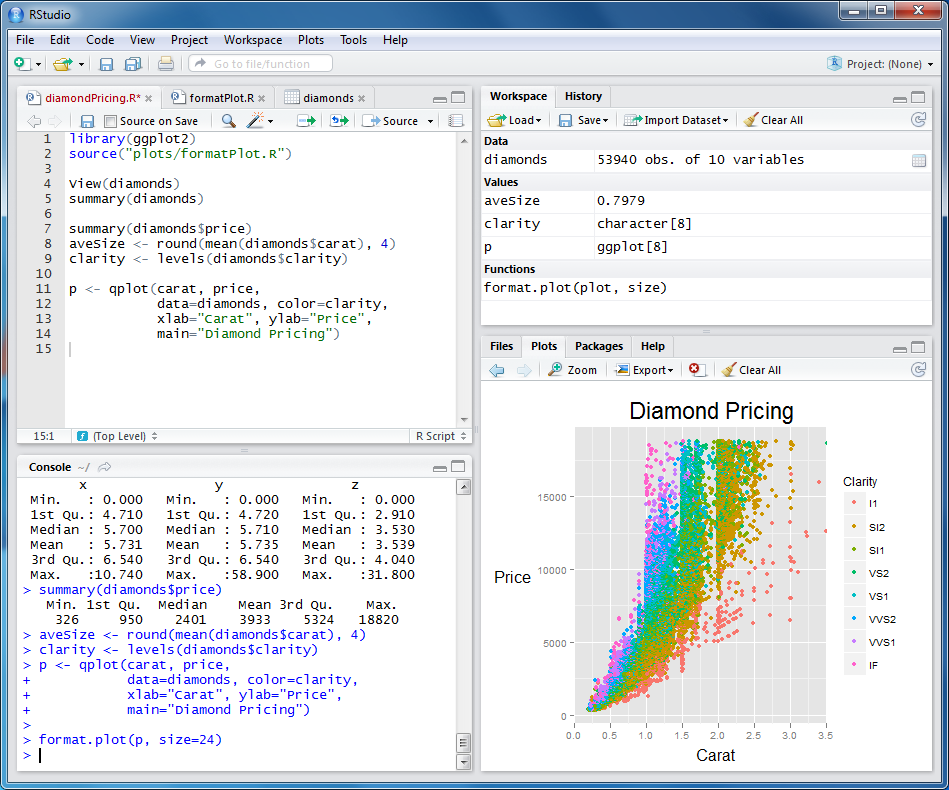
Amazed by RStudio!

RStudio (http://www.rstudio.com/) has to be one of the coolest pieces of software I have installed in recent memory.

RStudio provides a very well-planned and well-executed IDE for R.  This alone would be a reason to sing Hosanna.


But it gets better!!!  The Server package (deb and rpm packages available) allows you access to this same interface via a webserver, so you can run R on a beefy computational server from any web browser.  And it seems to work every bit as nicely as the locally installed IDE.

The user accounts are integrated with the linux user accounts, very nice.  I even got it to work (after reading this post) in a kerberos situation by overwriting the "rstudio" pam file that the RStudio package provides with the login one.  (You might want to back up  the rstudio one first).

# cd /etc/pam.d/
# cp login rstudio

Well done and thank you to the folks at the RStudio company.

Tuesday, October 16, 2012

How to demultiplex fastq files with a dedicated, separate barcode file

Oh, Barcodes, How do I obtain thee?  Let me count the ways:
1) Internal to one of the reads
2) Printed in the header:
3) Encoded in the header
4) In a separate file

There are many tools out there to deal with multiplexed read data.
fastx_barcode_splitter.pl (from FASTX_Toolkit)
fastq-multx (from ea-utils)
split_libraries_fastq.py (from QIIME)

As far as I know, none of the above adequately deal with case (4) above.  The QIIME tools does, but appears to turn the fastq into a fasta file in the process (?).

Here is a one-liner homebrew solution to this situation:  just tack the index reads onto the front of read1, and then use an off-the-shelf tool (I like the FASTX_Toolkit one above) to demultiplex.  Like this:

paste -d '' <(echo; sed -n '1,${n;p;}' R2.fq | sed G) R1.fq | sed '/^$/d' | fastx_barcode_splitter.pl --bol --bcfile barcodes.txt --prefix debarcoded

I am assuming that R2.fq is the barcode fastq file, and R1.fq is the is the Read 1 file.  The commands above take the 2nd and 4th lines from the barcode fastq file, spaces them out correctly, pastes them together (with no delimiter - note: '' is a double single-quote, not a single double-quote), and then uses another paste command to pre-pend THAT result to the R1 file.  Also there is a final sed command to remove the trailing blank lines.  It ain't pretty, but it works.

The fancy <(  ) constructs is a bash thing called "process substitution".  If you're not using bash, it won't work.

Hope this helps someone.

(edit:  I simplified the initial sed command on 2/1/2013, so let me know if it somehow broke, but it should still work fine.)

Thursday, October 11, 2012

1000 Genomes Project Accessibility Mask (BED file)


The 1000 genomes project publishes a .bed file mask ("Strict Accessibility Mask") for regions of the human genome where it is difficult to place reads, due to repetitivity.  Follow the link: